Article
November 22, 2026
4 min read
Inside Igarapé at the Waterline
Rain made the creek more convincing. Repeating the same routes showed where the water still looked wrong and where the browser struggled to keep up.
By Cristiano Pierry

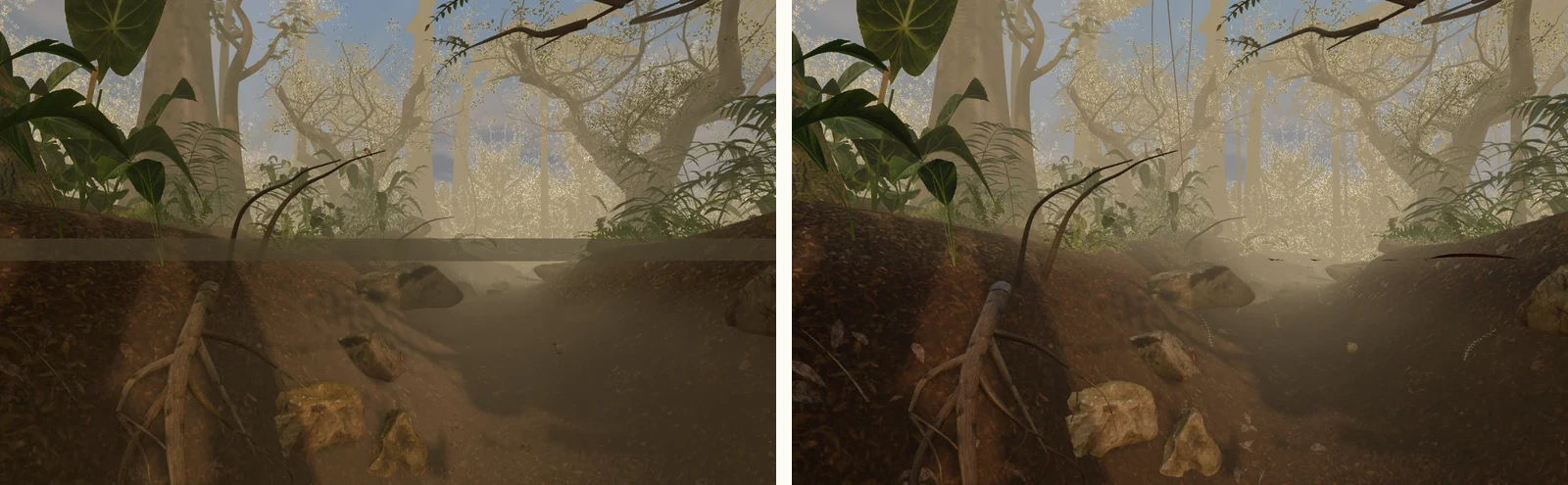
Coming up for air in Igarapé used to reveal a dark band across the screen. A moment earlier you could see submerged roots and stones. A moment later you could see the forest on the far bank. In between, the creek looked as if someone had laid a strip of tinted glass across it. The band appeared as the camera crossed the surface, which made it easy to miss in a screenshot taken from the bank.
Igarapé is a walkable simulation of an Amazonian creek. My earlier article about Igarapé started with a toucan and the question of where it got its fruit. I worked with Gemini Neon on a pass to improve how the forest looks and behaves. The review raised a question about the creek. What happens when you take a scene that looks good in isolation and walk through it? The storm was one of the clearest gains. Ripples broke up the reflections, and a lightning flash reached both the trunks and the creek. I wanted to keep that while making the same water hold together when you swam under it.
One creek, several views
From the bank, the browser draws a reflection of the forest. From underwater, it also needs a view looking up through the surface. The bright opening you see looking up has an optical counterpart called Snell’s window. Near its edge, more of the view comes from the underside of the water reflecting the scene below. The earlier render outlined that transition with a bright rim. Crossing the surface exposed a second problem, the dark band that cut across the view as reflections, refraction, and fog changed.
We softened the underwater rim and reduced the visibility of the water surface close to the camera during the crossing. The review ran the same camera paths in the earlier build and the candidate, using the same starting conditions and recording the simulation tick. We looked at the dry bank, the storm between flashes and during a flash, submerged roots, the return to air, and close views of a toucan and a jaguar. The side-by-side frames showed where the join had improved. Swimming through the crossing with the keyboard showed whether it held up during an ordinary visit.
Which clock does the deer follow?
The browser’s frame loop also affected what happened on the bank. The forest takes 60 simulation steps per second of forest time. The browser may advance several steps before drawing its next frame. The deer’s behavior and its updates about the jaguar were tied to that frame loop. A controlled test used a scripted jaguar approach to reproduce the difference. The deer reacted differently when the test updated the view every eight simulation steps versus every step.
The browser now updates the deer’s view of the jaguar after the resident animals move on each step. In the regression test, the deer enters the same states on the same ticks under both schedules. The unattended Node runner shares the resident simulation. The deer belongs to the browser walk, along with eleven other Reserva Ducke companion animal types. To repeat that encounter, the replay needs the browser’s companion layer.
The walk back
The matched captures could tell us that the storm looked better. We needed the running browser to tell us how regularly it drew the frames. On an M4 Pro running Chrome at High with a 1,152 × 720 render buffer, we ran the same return along the bank after the surrounding tiles had loaded in both builds. The earlier version’s median interval between frames was 16.7 milliseconds. In version 21 it was 33.3 milliseconds, with or without sound. In the muted storm run, both builds had a 16.7-millisecond median, while the 99th percentile rose from 33.5 to 83.4 milliseconds. In a muted run with Automatic graphics, the warm return reached a 16.8-millisecond median at a lower render resolution.
The next review can start below the surface, aimed at the opposite bank. Swim up and watch what happens at the waterline. Then walk out of the clearing and come back. The first route makes the water’s seams visible. The second makes it harder to mistake a good-looking frame for a smooth walk.
This writing reflects my personal perspectives on product management, AI, and content discovery. It does not represent the official position of my employer or any affiliated organization.